
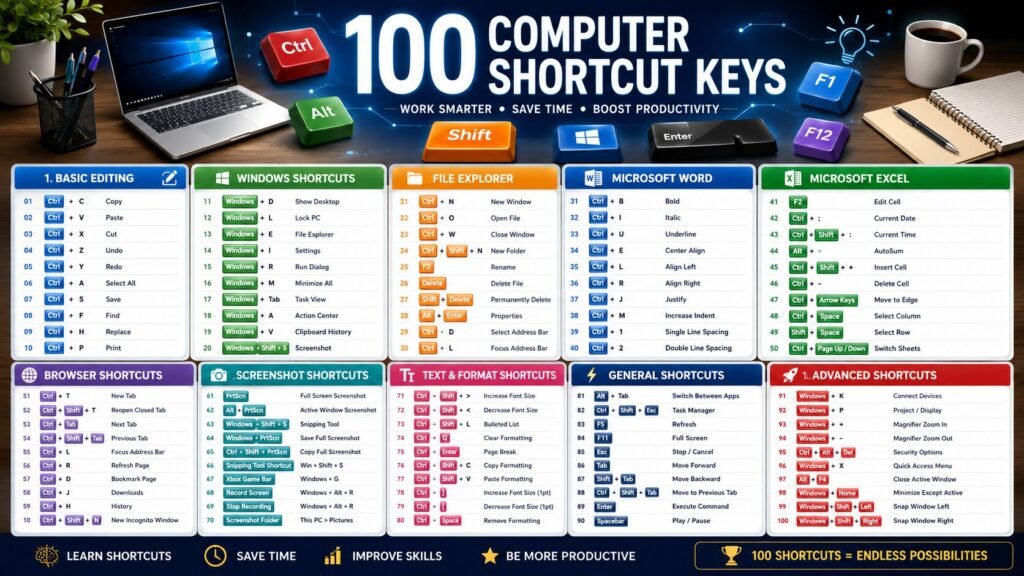
100 Computer Shortcut Keys are one of the easiest ways to work faster on a computer. Whether you’re a student, office employee, programmer, graphic designer, or gamer, learning shortcut keys can save hours every week.
Instead of searching through menus with your mouse, you can complete tasks instantly using your keyboard.
In this guide, you’ll learn the 100 most useful computer shortcut keys that work across Windows, Microsoft Office, browsers, and File Explorer.
Why Learn Keyboard Shortcuts?
Using keyboard shortcuts can significantly improve productivity.
Benefits
✔ Save time
✔ Improve work efficiency
✔ Reduce mouse usage
✔ Faster document editing
✔ Easier file management
✔ Better multitasking
✔ Professional workflow
Studies show experienced computer users perform tasks 30–50% faster using keyboard shortcuts.
100 Computer Shortcut Keys List
Basic Editing Shortcuts
| Shortcut | Function |
|---|---|
| Ctrl + C | Copy |
| Ctrl + V | Paste |
| Ctrl + X | Cut |
| Ctrl + Z | Undo |
| Ctrl + Y | Redo |
| Ctrl + A | Select All |
| Ctrl + S | Save |
| Ctrl + P | |
| Ctrl + F | Find |
| Ctrl + H | Replace |
File Management Shortcut Keys List
| Shortcut | Function |
|---|---|
| Ctrl + N | New Window |
| Ctrl + O | Open File |
| Ctrl + W | Close Window |
| Ctrl + Shift + N | New Folder |
| F2 | Rename |
| Delete | Delete File |
| Shift + Delete | Permanently Delete |
| Ctrl + D | Bookmark/Delete |
| Alt + Enter | Properties |
| Windows + E | File Explorer |
Windows Shortcut Keys List
| Shortcut | Function |
|---|---|
| Windows + D | Show Desktop |
| Windows + L | Lock Computer |
| Windows + R | Run |
| Windows + I | Settings |
| Windows + A | Action Center |
| Windows + M | Minimize All |
| Windows + Tab | Task View |
| Windows + V | Clipboard History |
| Windows + Shift + S | Screenshot |
| Windows + K | Connect Devices |
Browser Shortcut Keys List
| Shortcut | Function |
|---|---|
| Ctrl + T | New Tab |
| Ctrl + Shift + T | Reopen Closed Tab |
| Ctrl + Tab | Next Tab |
| Ctrl + Shift + Tab | Previous Tab |
| Ctrl + L | Address Bar |
| Ctrl + R | Refresh |
| Ctrl + D | Bookmark |
| Ctrl + J | Downloads |
| Ctrl + H | History |
| Ctrl + Shift + N | Incognito Window |
Keyboard Shortcuts in Microsoft Word
Microsoft Word Shortcut Keys List
| Shortcut | Function |
|---|---|
| Ctrl + B | Bold |
| Ctrl + I | Italic |
| Ctrl + U | Underline |
| Ctrl + E | Center |
| Ctrl + L | Left Align |
| Ctrl + R | Right Align |
| Ctrl + J | Justify |
| Ctrl + M | Increase Indent |
| Ctrl + 1 | Single Spacing |
| Ctrl + 2 | Double Spacing |
Microsoft Excel Shortcut Keys List
| Shortcut | Function |
|---|---|
| F2 | Edit Cell |
| Alt + = | AutoSum |
| Ctrl + ; | Current Date |
| Ctrl + Shift + “+” | Insert Cell |
| Ctrl + “-“ | Delete Cell |
| Ctrl + Arrow | Move to Edge |
| Ctrl + Space | Select Column |
| Shift + Space | Select Row |
| Ctrl + Page Up | Previous Sheet |
| Ctrl + Page Down | Next Sheet |
Text Formatting Shortcut Keys List
- Ctrl + Shift + >
- Ctrl + Shift + <
- Ctrl + Shift + L
- Ctrl + Q
- Ctrl + Enter
- Ctrl + Shift + C
- Ctrl + Shift + V
- Ctrl + ]
Screenshot Shortcut Keys List
- Print Screen
- Alt + Print Screen
- Windows + Shift + S
- Windows + Print Screen
Most Popular Shortcut Keys Explained
Ctrl + C
Copies selected text, images, or files.
Ctrl + V
Pastes copied content.
Ctrl + Z
Undo the last action.
Ctrl + Shift + T
Reopens the recently closed browser tab.
Windows + Shift + S
Opens Windows Snipping Tool for screenshots.
Windows + D
Instantly minimizes all windows.
Ctrl + Shift + Esc
Opens Task Manager directly.
Ctrl + Mouse Wheel
Zoom in and out of documents or webpages.
Shortcut Keys for Students
Students can save time by using shortcuts while preparing assignments.
Recommended shortcuts:
- Ctrl + S
- Ctrl + F
- Ctrl + P
- Ctrl + B
- Ctrl + I
- Ctrl + U
- Ctrl + H
- Ctrl + Shift + S
- Ctrl + Z
- Ctrl + Y
Shortcut Keys for Office Employees
Office professionals frequently use:
- Ctrl + C
- Ctrl + V
- Ctrl + Shift + T
- Alt + Tab
- Windows + D
- Ctrl + Shift + Esc
- Windows + E
- Ctrl + Shift + N
- Ctrl + L
- Ctrl + R
Keyboard Shortcuts for Windows 11
Windows 11 introduces several productivity shortcuts.
Popular ones include:
- Windows + W
- Windows + Z
- Windows + V
- Windows + Shift + S
- Windows + Tab
- Windows + D
- Windows + L
- Windows + A
- Windows + N
- Windows + K
Frequently Asked Questions
What are computer shortcut keys?
Shortcut keys are keyboard combinations that perform commands quickly without using a mouse.
Why should I learn shortcut keys?
They improve productivity, reduce repetitive work, and help complete tasks much faster.
Do shortcut keys work on Windows 11?
Yes. Most keyboard shortcuts work on Windows 10 and Windows 11.
Which shortcut is used to copy?
Ctrl + C
Which shortcut is used for screenshots?
Windows + Shift + S
Which shortcut opens Task Manager?
Ctrl + Shift + Esc
Conclusion
Learning keyboard shortcuts is one of the easiest ways to become more productive. Whether you are using Microsoft Word, Excel, Google Chrome, or Windows 11, mastering these 100 computer shortcut keys can save countless hours and make your workflow much smoother.
Bookmark this page and practice a few shortcuts every day. Within a week, you’ll notice a significant improvement in your speed and efficiency.