
Emoji Keyboard Shortcuts for Transport: In today’s digital age, emojis are a staple of online communication. They add color, emotion, and context to our messages. While many people use emojis by selecting them from a virtual keyboard, there’s another method that tech enthusiasts and professionals use: Alt code shortcuts. These keyboard shortcuts can be a game-changer, especially if you frequently incorporate emojis into your digital content. In this post, we’ll delve into the world of Alt code shortcuts specifically for transport emoji symbols, offering you a comprehensive guide to streamline your typing process.
Table of Contents : Emoji Shortcut Key
What are Alt Code Emoji Shortcuts?
Holding down the “Alt” key while inputting a code on your numeric keypad allows you to insert special characters or symbols into text documents using a set of numerical codes called alt codes. This method dates back to early computer systems and remains a powerful tool for those in the know. For emojis, particularly transport symbols, these codes can be incredibly useful for quickly adding specific icons to your documents, presentations, or social media posts.
Why Use Alt Code Shortcuts for Emojis?
Alt code shortcuts provide several benefits:
- Efficiency: Quickly insert symbols without searching through emoji menus.
- Consistency: Use the same method across different software and platforms.
- Professionalism: Streamline your workflow, especially useful for those in fields like social media management, content creation, and digital marketing.
Comprehensive List of Transport Emoji Alt Code Shortcuts
Here’s a detailed list of transport emojis, their names, Windows shortcuts, Word shortcuts, and their respective categories:
Emoji Keyboard Shortcut windows
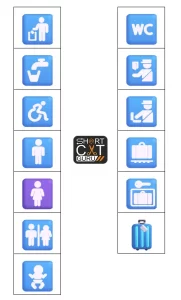
| 🚮 | Litter In Bin Sign: Alt + 128686 or 1F6AE Alt + X |
| 🚰 | Potable Water: Alt + 128688 or 1F6B0 Alt + X |
| ♿ | Wheelchair Symbol: Alt + 9855 or 267F Alt + X |
| 🚹 | Men’s Room: Alt + 128697 or 1F6B9 Alt + X |
| 🚺 | Women’s Room: Alt + 128698 or 1F6BA Alt + X |
| 🚻 | Restroom: Alt + 128699 or 1F6BB Alt + X |
| 🚼 | Baby Symbol: Alt + 128700 or 1F6BC Alt + X |
| 🚾 | Water Closet: Alt + 128702 or 1F6BE Alt + X |
| 🛂 | Passport Control: Alt + 128706 or 1F6C2 Alt + X |
| 🛃 | Customs: Alt + 128707 or 1F6C3 Alt + X |
| 🛄 | Baggage Claim: Alt + 128708 or 1F6C4 Alt + X |
| 🛅 | Left Luggage: Alt + 128709 or 1F6C5 Alt + X |
| 🧳 | Luggage: Alt + 129523 or 1F9F3 Alt + X |
Ground Transport
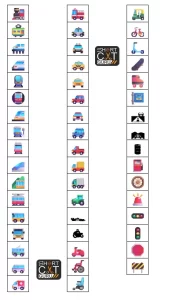
| 🚂 | Locomotive: Alt + 128642 or 1F682 Alt + X |
| 🚃 | Railway Car: Alt + 128643 or 1F683 Alt + X |
| 🚄 | High-Speed Train: Alt + 128644 or 1F684 Alt + X |
| 🚅 | Bullet Train: Alt + 128645 or 1F685 Alt + X |
| 🚆 | Train: Alt + 128646 or 1F686 Alt + X |
| 🚇 | Metro: Alt + 128647 or 1F687 Alt + X |
| 🚈 | Light Rail: Alt + 128648 or 1F688 Alt + X |
| 🚉 | Station: Alt + 128649 or 1F689 Alt + X |
| 🚊 | Tram: Alt + 128650 or 1F68A Alt + X |
| 🚝 | Monorail: Alt + 128669 or 1F69D Alt + X |
| 🚞 | Mountain Railway: Alt + 128670 or 1F69E Alt + X |
| 🚋 | Tram Car: Alt + 128651 or 1F68B Alt + X |
| 🚌 | Bus: Alt + 128652 or 1F68C Alt + X |
| 🚍 | Oncoming Bus: Alt + 128653 or 1F68D Alt + X |
| 🚎 | Trolleybus: Alt + 128654 or 1F68E Alt + X |
| 🚐 | Minibus: Alt + 128656 or 1F690 Alt + X |
| 🚑 | Ambulance: Alt + 128657 or 1F691 Alt + X |
| 🚒 | Fire Engine: Alt + 128658 or 1F692 Alt + X |
| 🚓 | Police Car: Alt + 128659 or 1F693 Alt + X |
| 🚔 | Oncoming Police Car: Alt + 128660 or 1F694 Alt + X |
| 🚕 | Taxi: Alt + 128661 or 1F695 Alt + X |
| 🚖 | Oncoming Taxi: Alt + 128662 or 1F696 Alt + X |
| 🚗 | Automobile: Alt + 128663 or 1F697 Alt + X |
| 🚘 | Oncoming Automobile: Alt + 128664 or 1F698 Alt + X |
| 🚙 | Sport Utility Vehicle: Alt + 128665 or 1F699 Alt + X |
| 🛻 | Pickup Truck: Alt + 128763 or 1F6FB Alt + X |
| 🚚 | Delivery Truck: Alt + 128666 or 1F69A Alt + X |
| 🚛 | Articulated Lorry: Alt + 128667 or 1F69B Alt + X |
| 🚜 | Tractor: Alt + 128668 or 1F69C Alt + X |
| 🏎 | Racing Car: Alt + 127950 or 1F3CE Alt + X |
| 🏍 | Motorcycle: Alt + 127949 or 1F3CD Alt + X |
| 🛵 | Motor Scooter: Alt + 128757 or 1F6F5 Alt + X |
| 🦽 | Manual Wheelchair: Alt + 129469 or 1F9BD Alt + X |
| 🦼 | Motorized Wheelchair: Alt + 129468 or 1F9BC Alt + X |
| 🛺 | Auto Rickshaw: Alt + 128762 or 1F6FA Alt + X |
| 🚲 | Bicycle: Alt + 128690 or 1F6B2 Alt + X |
| 🛴 | Kick Scooter: Alt + 128756 or 1F6F4 Alt + X |
| 🛹 | Skateboard: Alt + 128761 or 1F6F9 Alt + X |
| 🛼 | Roller Skate: Alt + 128764 or 1F6FC Alt + X |
| 🚏 | Bus Stop: Alt + 128655 or 1F68F Alt + X |
| 🛣 | Motorway: Alt + 128739 or 1F6E3 Alt + X |
| 🛤 | Railway Track: Alt + 128740 or 1F6E4 Alt + X |
| 🛢 | Oil Drum: Alt + 128738 or 1F6E2 Alt + X |
| ⛽ | Fuel Pump: Alt + 9981 or 26FD Alt + X |
| 🛞 | Wheel: Alt + 128734 or 1F6DE Alt + X |
| 🚨 | Police Car Light: Alt + 128680 or 1F6A8 Alt + X |
| 🚥 | Horizontal Traffic Light: Alt + 128677 or 1F6A5 Alt + X |
| 🚦 | Vertical Traffic Light: Alt + 128678 or 1F6A6 Alt + X |
| 🛑 | Stop Sign: Alt + 128721 or 1F6D1 Alt + X |
| 🚧 | Construction: Alt + 128679 or 1F6A7 Alt + X |
Water Transport
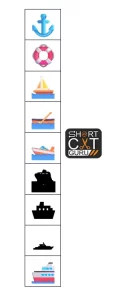
| ⚓ | Anchor: Alt + 9875 or 2693 Alt + X |
| 🛟 | Ring Buoy: Alt + 128735 or 1F6DF Alt + X |
| ⛵ | Sailboat: Alt + 9973 or 26F5 Alt + X |
| 🛶 | Canoe: Alt + 128758 or 1F6F6 Alt + X |
| 🚤 | Speedboat: Alt + 128676 or 1F6A4 Alt + X |
| 🛳 | Passenger Ship: Alt + 128755 or 1F6F3 Alt + X |
| ⛴ | Ferry: Alt + 9972 or 26F4 Alt + X |
| 🛥 | 🛥 Motor Boat: Alt + 128741 or 1F6E5 Alt + X |
| 🚢 | Ship: Alt + 128674 or 1F6A2 Alt + X |
Air Transport

| ✈ | Airplane: Alt + 9992 or 2708 Alt + X |
| 🛩 | Small Airplane: Alt + 128745 or 1F6E9 Alt + X |
| 🛫 | Airplane Departure: Alt + 128747 or 1F6EB Alt + X |
| 🛬 | Airplane Arrival: Alt + 128748 or 1F6EC Alt + X |
| 🛞 | Wheel: Alt + 128734 or 1F6DE Alt + X |
| 💺 | Seat: Alt + 128186 or 1F4BA Alt + X |
| 🚁 | Helicopter: Alt + 128641 or 1F681 Alt + X |
| 🪂 | Parachute: Alt + 129666 or 1FA82 Alt + X |
| 🪁 | Kite: Alt + 129665 or 1FA81 Alt + X |
| 🛰 | Satellite: Alt + 128752 or 1F6F0 Alt + X |
| 🚀 | Rocket: Alt + 128640 or 1F680 Alt + X |
| 🛸 | Flying Saucer: Alt + 128760 or 1F6F8 Alt + X |
| 🛎 | Bellhop Bell: Alt + 128718 or 1F6CE Alt + X |
| 🧳 | Luggage: Alt + 129523 or 1F9F3 Alt + X |
Miscellaneous Transport
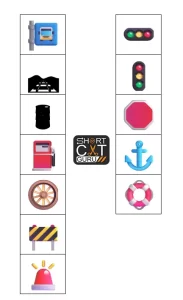
| 🚏 | Bus Stop: Alt + 128655 or 1F68F Alt + X |
| 🛤 | Railway Track: Alt + 128740 or 1F6E4 Alt + X |
| 🛢 | Oil Drum: Alt + 128738 or 1F6E2 Alt + X |
| ⛽ | Fuel Pump: Alt + 9981 or 26FD Alt + X |
| 🛞 | Wheel: Alt + 128734 or 1F6DE Alt + X |
| 🚧 | Construction: Alt + 128679 or 1F6A7 Alt + X |
| 🚨 | Police Car Light: Alt + 128680 or 1F6A8 Alt + X |
| 🚥 | Horizontal Traffic Light: Alt + 128677 or 1F6A5 Alt + X |
| 🚦 | Vertical Traffic Light: Alt + 128678 or 1F6A6 Alt + X |
| 🛑 | Stop Sign: Alt + 128721 or 1F6D1 Alt + X |
| ⚓ | Anchor: Alt + 9875 or 2693 Alt + X |
| 🛟 | Ring Buoy: Alt + 128735 or 1F6DF Alt + X |
FAQs : Emoji Keyboard Shortcuts for Transport
How do I use Alt code shortcuts?
To use Alt code shortcuts on a Windows computer:
- Ensure that your Num Lock is turned on.
- Hold down the “Alt” key.
- Type the numerical code for the emoji using the numeric keypad.
- Release the “Alt” key, and the emoji will appear.
Can I use Alt code shortcuts on a Mac?
Mac computers do not support Alt code shortcuts in the same way that Windows does. As an alternative, you can use the Character Viewer to enter special symbols and emoticons.
Why aren’t my Alt codes working?
Make sure Num Lock is turned on and that you are using the numerical keypad. Some laptops may require you to use a function key in combination with the numeric keypad.
Do all programs support Alt code shortcuts?
Most Windows applications, including Microsoft Word and web browsers, support Alt code shortcuts. However, some programs may have different methods for inserting special characters.
Are there Alt code shortcuts for all emojis?
Not all emojis have corresponding Alt code shortcuts. Special letters and symbols are the most typical use cases for alt codes. Use the emoji keyboard on your device for a wider range of emojis.
Can I customize my Alt code shortcuts?
Windows does not natively support customization of Alt code shortcuts. However, you can use third-party software to create custom keyboard shortcuts for inserting emojis and symbols.
Are there alternatives to Alt code shortcuts for inserting emojis?
Yes, you can use the emoji keyboard on your device, copy and paste emojis from online databases, or use software-specific methods like the Character Map on Windows or Character Viewer on Mac.
How can I learn more about Alt code shortcuts?
Numerous online resources and databases provide comprehensive lists of Alt code shortcuts. You can also explore software manuals and help sections for more detailed information.
Conclusion
Alt code shortcuts are a powerful tool for anyone who regularly uses transport emojis and other special symbols in their digital communications. By mastering these shortcuts, you can enhance your efficiency, maintain consistency across different platforms, and add a professional touch to your work. Whether you’re a social media manager, content creator, or someone who loves emojis, this guide offers valuable insights into Alt code shortcuts. So start working, and you’ll notice a significant boost in output!
Your point of view caught my eye and was very interesting. Thanks. I have a question for you.
Can you be more specific about the content of your article? After reading it, I still have some doubts. Hope you can help me.